
 By
By The summer is a great time to optimise your Online Store! We have some new and exciting features to share with you as well as a reminder of some existing features you may not yet be taking advantage of. Use the guide below to Supercharge your Online Store this summer.
Increase Conversion with an Optimised Product Detail Page
Enhance the customer experience with Multi Option Version Buttons
Are you selling products that have multiple versions, e.g. trousers that need to display size, length, and width? Our new Multi-Option Version Buttons will provide a more intuitive mobile friendly customer journey.

For more info visit our support article on using version tables or contact the Helpdesk for support.
There is also lots of existing functionality that you can implement to optimise your Product Detail Page.
Supercharge your Conversion with our Dynamic Merchandising Widget
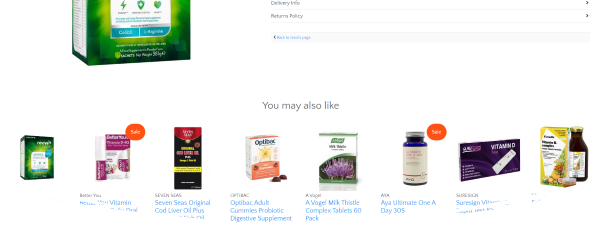
Recently launched our Dynamic Merchandising Widget is an automated panel of Product Recommendations that can be set up to display at the top of category landing pages or under the image display on product detail pages.
The widget offers a variety of different configuration options for Category Pages & Product Detail Pages. When you are configuring the display you can set up the widget to display top products, products that have been viewed the most, display products from a combination of related categories or display products from the same brand category.
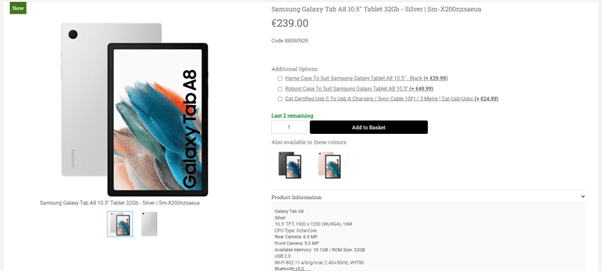
Increase Average Basket Value with our Upsell Add On Functionality
Encourage customers to increase their basket value by displaying products that go hand in hand or are an essential add on.
Examples of these products include offering a Tanning Mitt with a Tanning Cream, associated Batteries or accessories for a Toy, Drill Bits with a Drill etc.
See AB Commerce support article here.
Increase Conversion with Advanced Stock Messaging
Concern over short supply drives demand and increases conversion rate
Consider including some of our advanced stock messages e.g. ‘5 In Stock, ‘Only 3 Left’, ‘Low Stock’ to drive demand. If a high demand product is coming back into stock, display ‘Out of Stock – Next Available Date July 30th’ or instead of ‘Out of Stock’ you can allow the product to be purchased now and activate ‘Ships in 10 days’ message.
Enrich the Shopping Experience with Related Products
If you would like to feature the same product in a different colour on the product detail page you can set up these Products to display just under the Add to Basket Button. This feature would be great for showcasing the same item of clothing or a shoe, a tan, makeup that comes in a different colour
Talk to the Helpdesk team about the best way to implement this feature
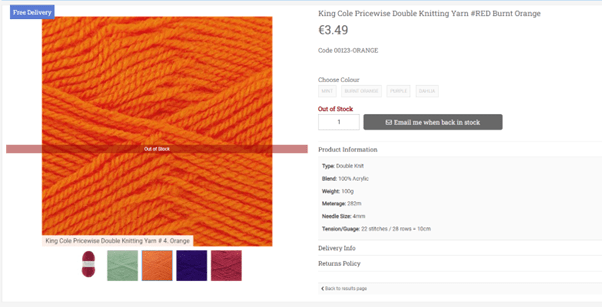
Don’t lose out on sales, activate Out of Stock Email Alerts
During peak periods, popular products will sell quickly and you don’t want to miss out on the opportunity to convert a sale while you restock. You can now offer your customers the option to sign up for an Out of Stock Email alert from the product detail page so they are notified by email when that product is back in stock. The email alert facility will also inform you what products your customers are interested in and what quantity of that product they want to purchase, you can use this information to guide your buying decisions.
More info here
Aid the purchasing decision by displaying Version Images
Enhance the customers shopping experience and make it easier for them to make a purchasing decision by associating specific images to the colour options available. This works particularly well for various shades of wool, makeup or lipsticks.
As you select your version colour button, the image gallery will update to display the associated version for that colour. In addition the version names appear underneath the image which is particularly useful as it provides a reference for customers as they navigate through images of the various colour options.
See more info here
Drive sales with the Free Delivery Icon
Free Shipping is a great incentive to drive sales, automate the display of a Free Shipping Icon on your product image for products where the price of the product is greater than your Free Shipping Threshold. The product icon will display on the product image in product feature widgets, on the product list page and on the product detail page.
Optimise your Checkout
Multiple Shipping Options
Todays customer expects very high levels of customer service, one way of providing a superior customer service is to offer multiple shipping options.
For example, you may want to allow for Standard Delivery with a description of Allow 2-5 days for delivery and a 2nd option for Next Day with a description of Allow 1-2 days for delivery
More info here
Google Pay & Apple Pay with Stripe
We are delighted to offer Apple Pay & Google Pay as a payment option at the payment stage of the checkout process for our Stripe Customers.
Instalment Payments
If you are selling High Ticket Items, why not offer the option for the customer to pay in installments via HUMM. Once the customer has been approved by HUMM they can purchase from any site that offers this functionality. The installment payment option is displayed to the customer on the product detail page and offered as a payment option at the final stage of checkout
Conversion Tactics
Encourage Spend to achieve Free Shipping

Incentivise the customer to increase their basket value by displaying to the customer how much more they need to spend to get free shipping as they build their basket
Contact the Helpdesk to have this enabled
Drive urgency with Countdown Widgets
Use the Countdown Widget to drive urgency and encourge the customer to convert as you approach the end of Summer promotions. ‘Don’t miss out, we are selling out fast, 2 days to end of Summer Promotions’
Also use Countdown Widget to ensure good customer service, leave nobody disappointed and use the countdown widget to signpost last date for delivery before Back to School. Display in the sitewide feature area at the top of your site and it will be visible to customers as they navigate your online store.
Abandon Basket Emails
Increase conversion rate by triggering Abandon Basket Emails for customers who have started the checkout process but have yet to complete the purchase.
Configuration options give you the flexibility to decide the text in the email and its timing.
More info here
Streamline your Operations
Advanced Email Architecture
Emails to date have been primarily plain text but now with our new advanced email architecture you have the ability to customise the emails to bring them inline with your branding. You can now edit your emails and include
- Logos
- Branding elements
- Social media links
Email helpdesk@magico.com to enable this.
Wave OMS Integration
A new upgrade offers a full integration with the Wave OMS fulfilment engine. Wave OMS calls a web service to download your orders from AB Commerce to their engine where orders are fulfilled via a 4 step process Pick, Sort, Pack and Ship. In the AB Commerce back end, your orders are assigned to a new status called ‘Order Sent to Warehouse’. When order processing is complete on Wave OMS, the order status in AB Commerce will be automatically updated to Order Complete or Order ready for collection.
Through their software and logical order workflow, Wave OMS fulfils eCommerce orders with maximum speed and minimum cost per order. It unlocks growth potential and supercharges Pack, Pick & Shipping capabilities in organisations of all shapes and sizes. Implementation of WAVE OMS has proven to increase the speed and efficiency of getting orders out the door and it will significantly reduce the resources required to achieve this. Optimising order fulfilment is a key step to ensuring you can grow and scale your online store.
Retention Strategies
Advanced Mailchimp & Klaviyo Integrations
Increase your customer retention with the digital marketing channel that has the highest ROI, Email Marketing.
Benefit from the rich features of the full integration with our newest email marketing partner Klaviyo.
Our retailers using Mailchimp can now take advantage of the Connected Store integration that allows for a full basket data transfer
For more info contact Jillian by emailing joleary@magico.com
Yotpo Integration
We are delighted to offer an upgrade integration to Yotpo, a leading marketing retention platform. Yotpo provide both Loyalty and Review functionality.
Multi Outlet Retailers
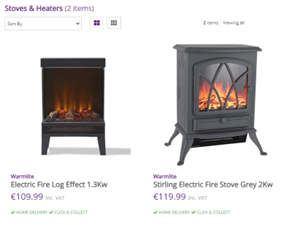
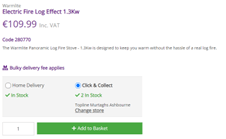
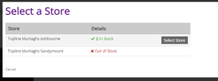
An exciting new feature for our multi outlet Retailers is the ability to display products that are available for Home Delivery and or Click and Collect on the product list page .
Customers have the option to select their store of choice for Click and Collect Service and the number of units available in the store is displayed to the customer. This provides a true omnichannel experience.
If you are interested in this upgrade contact Helpdesk.

 AB Commerce blog